
GoProposal vs FigsFlow: Which is right for you!
GoProposal vs FigsFlow : Compare features, pricing & integrations to choose the best proposal software for accountants in 2025. Find your fit today!
Your Proposals and engagement letters are the first impression you make with your clients and its worth making it count. But let’s face it, drafting these documents is time consuming and overwhelming.
That is where software like GoProposal and FigsFlow steps in, helping you craft clear, professional, and customisable documents quickly, and saving your valuable time for what truly matters.
But which platform best serves your needs as an accountant?

3/5 ★★★☆☆
GoProposal: The smarter way to engage clients for accounting businesses

4.7/5 ★★★★⯪
Proposal, Pricing, & Engagement Software for Accountancy, Tax Advisory & Bookkeeping Firms
We, at FigsFlow tested both these software over several months and evaluated their features across the following key areas.
- Proposals
- Engagement Letters
- Pricing Calculators
- CRM & Sales Management
- Integrations
- Automation
You can use our test results across these parameters and use the decision-making dashboard at the end to make an unbiased judgement and decide which software is best fit for your firm.
Product Overview: GoProposal vs FigsFlow
GoProposal and FigsFlow are both powerful tools for accountants. While GoProposal focuses on simplifying engagement letter, FigsFlow offers all-in-one client onboarding with automated workflow for service pricing, proposal and engagement letter.
Here’s the side-by-side overview of both platforms.
| Features | GoProposal | FigsFlow |
|---|---|---|
| Proposal Creation and Customisation | Limited template customisation; brand colours and fonts cannot be changed | Fully customisable — brand colours, fonts, layout, and service content |
| Engagement Letter Templates | Requires OverSuite add-on (£45 to £90/month); 15 to unlimited templates depending on tier | Included in all plans; 100+ service-tailored templates, no add-on required |
| Engagement Letter Compliance | UK and global bodies (ACCA, AAT, ICAEW, CIOT, ATT, CIMA, and more) available via OverSuite add-on | UK and global bodies (ACCA, AAT, ICAEW, CIOT, ATT, CIMA, and more) included as standard across all plans |
| Service Pricing Calculator | Core Pricing Matrix based on best practice benchmarks; requires manual upkeep to stay current | Advanced pricing engine with dynamic variables supporting fixed, value-based, tiered, contingent, milestone, and hybrid pricing models |
| AML and Compliance | Available as a paid add-on (GoProposal AML); covers KYC and risk assessments only | Built into all plans — KYC, AML checks, PEP and sanctions screening, Customer Risk Rating, Enhanced Due Diligence, firm-wide risk assessment, liveness checks, and full audit trail |
| E-Signatures | Requires OverSuite add-on | Included in all plans, no add-on required |
| Time to Generate Proposal | Approximately 5 minutes | Approximately 30 seconds |
| CRM and Sales Management | Proposal tracking (Sent, Live, Seen, Won, Lost); no native CRM | Proposal tracking with reminders, auto-expiry, and native HubSpot integration |
| Starting Price | £70/month (Solo plan, 1 user, 5 proposals) | £8/month (Starter plan, 1 user, 10 proposals) |
| Third-Party Integrations | Xero, QuickBooks, Sage, GoCardless, Zapier, AccountancyManager, Senta, Karbon, Dext Precision | Xero, QuickBooks, Stripe, Gmail, Outlook, HubSpot, Zapier, Companies House |
Now that you have general sense of each platform, let’s take a closer look at how each software performs in each of these key areas.
Which Tool Offers Better User Experience & Interface?
FigsFlow presents a clean interface with sleek design and well-organised layout. The initial setup process is designed to tailor the platform to specific requirement of the firm, thereby ensuring a personalised experience from the outset.
Plus, the related features are bundled together in a module and rightly placed, enhancing the user’s navigation and giving the platform premium and minimalistic look.
Here’s a look at FigsFlow’s dashboard.
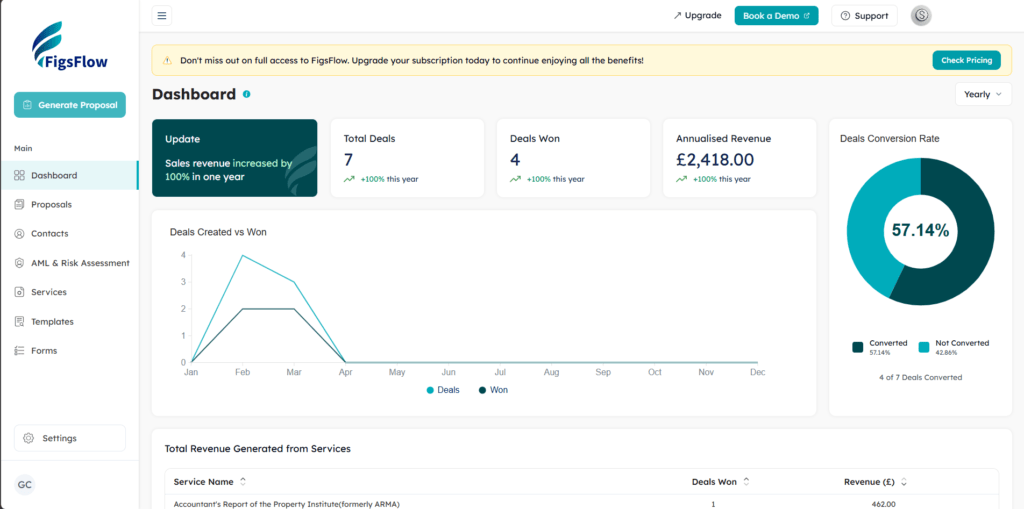
GoProposal also offers similar state-of-the art user Interface. Just like FigsFlow, features are easy to navigate, and the process is well-defined and well thought.
We assessed GoProposal and FigsFlow across multiple devices and areas of service delivery. Here’s the test result.
| UI/UX | GoProposal | FigsFlow |
|---|---|---|
| Proposal and Pricing | Generally easy to navigate with minor hiccups | Streamlined with a well-organised interface |
| Engagement Letter Generation | Requires more inputs about client details and services | Generates engagement letter alongside the proposal in a single workflow |
| Client Onboarding | Difficult to locate the feature to add a point of contact | Client details can be entered quickly to generate both proposal and LOE |
| CRM and Sales Management | Cluttered interface with poor visualisation of data | Proposal tracking and deal metrics available; native CRM via HubSpot integration |
| Team Collaboration and Oversight | Team members can pick up, edit, and update proposals and LOEs drafted by colleagues | Team members can pick up, edit, and update proposals and LOEs drafted by colleagues |
Which Tool Excels in Proposal Creation & Customisation?
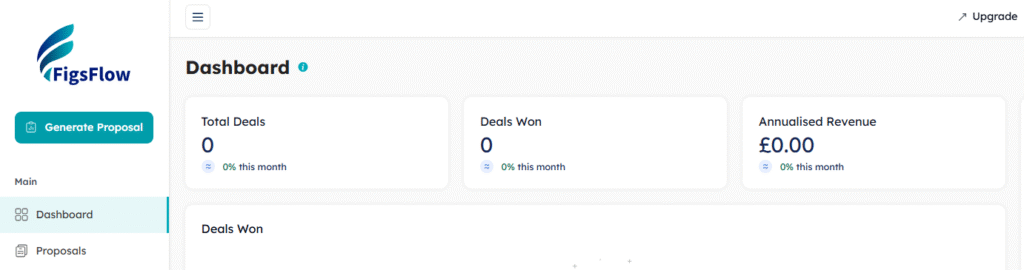
Creating a proposal in FigsFlow is fast by design. From the home dashboard, click “Generate Proposal” and the platform walks you through a structured workflow:
- Select from a library of 150+ pre-built services
- Set the point of contact
- Review auto-calculated pricing
- Proceed to preview and send
The entire process takes under 60 seconds.
What makes it stand out is the depth behind that simplicity. For each service, FigsFlow calculates the fee using configurable pricing variables including transaction volume, quality of records, VAT status, and frequency of reporting. Discounts, catch-up fees, and associated services can all be added inline, with a live running total visible throughout. Once you reach the preview, the proposal is fully assembled and ready to send. You can edit wording, attach documents, or save it as a draft without touching the master template.
You also have full control over presentation. Brand colours, fonts, and layout are all customisable, so every proposal goes out looking like it came from your firm rather than off-the-shelf software.
GoProposal follows a broadly similar workflow, but the comparison stops there. Its proposal templates are not freely customisable and brand colours and font choices are restricted. More notably, users need to manually input a significant amount of client and service data before a proposal can be generated, which adds time and creates room for inconsistency across the team.
For firms that issue proposals regularly, the gap in speed and flexibility is difficult to ignore.
| Features | GoProposal | FigsFlow |
|---|---|---|
| Proposal Reminders | Email reminder feature available for internal users only | Automatic signature reminders sent to clients; fully customisable follow-up timing |
| Proposal Auto-Expiry | Proposal expiry period cannot be customised | Custom proposal expiry period can be set per proposal |
| Email Notifications | Pre-built email templates available | Pre-built email templates available |
| Reactivating Lost Proposals | Not available; a new proposal must be created from scratch | Lost proposals can be reactivated and resent for client review |
| Proposal Tracking | Auto status marking as Sent, Live, Seen, Won, and Lost | Auto status marking as Live, Draft, and Won |
| Proposal and Deal Metrics | Proposal targets can be set and tracked | Total deals, deals won, annualised revenue, and conversion rate tracked monthly, quarterly, and annually |
| Service Customisation | Services can be customised per client requirements | Services can be customised per client requirements |
Which Tool Handles Engagement Letters More Efficiently?
For most accounting firms, engagement letters are a compliance necessity but they are also one of the most time-consuming documents to get right. FigsFlow addresses this directly with a library of 100+ pre-built LOE templates, compliant with the requirements of UK and global professional bodies including ACCA, ICAEW, CIOT, CIMA, ATT, AAT, ICAS, IFA, and more.
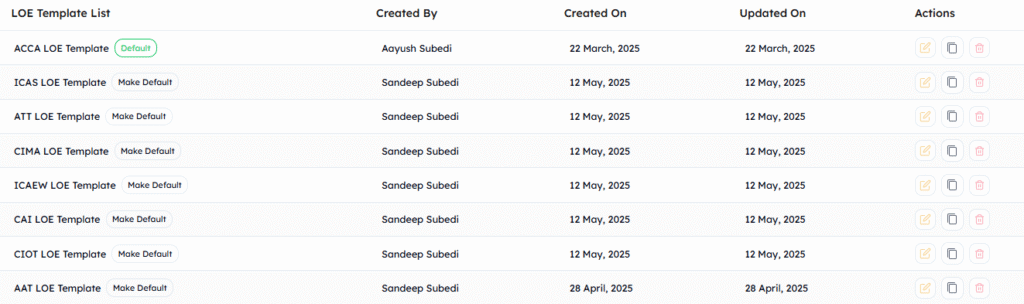
The workflow is straightforward. Select a template, customise the wording and clauses directly within the real-time preview editor, and the LOE is generated alongside the proposal in one step. Each change you make applies only to that client’s document — the master template stays intact. For firms working with group structures or multiple signatories, FigsFlow generates separate, individually compliant engagement letters for each entity or signatory from a single proposal, which is particularly important for bodies like ACCA.
Firms that bill on hourly or previous-year rates can also skip the proposal entirely and send a standalone LOE using the LOE-only mode, with no workarounds required.

GoProposal follows a similar process but has a significant structural limitation. Engagement letter templates are locked behind OverSuite, a paid add-on that starts at £45 per month excluding VAT. Without it, users on any plan, including higher tiers, cannot access compliance-aligned templates, send standalone engagement letters, or benefit from automatic updates when regulatory requirements change. E-signatures are also part of the OverSuite add-on rather than included as standard.
FigsFlow includes all of this across every plan from day one, with no add-ons required.
| Features | GoProposal | FigsFlow |
|---|---|---|
| Build Your Template Library | Cannot customise existing templates; can only build a separate personalised library from scratch | Customise pre-built regulatory compliant templates per client and build a personalised library on top |
| Regulatory Compliant Templates | Requires OverSuite add-on from £45/month excluding VAT | Included in all plans; compliant with ACCA, ICAEW, CIOT, CIMA, ATT, AAT, ICAS, IFA, and more |
| Service-Tailored LOE Templates | Requires OverSuite add-on | Included in all plans; 100+ templates covering all major accounting services |
| Instant E-Signatures | Requires OverSuite add-on | Built in across all plans; no DocuSign or third-party tool required |
| Auto-Updates for LOE Templates | Requires OverSuite add-on | Included in all plans; templates updated automatically in line with regulatory changes |
| Send Engagement Letter Without Proposal | Requires OverSuite add-on | Included in all plans via LOE-only mode |
| LOE Templates by Entity Type | Not available | Included in all plans; separate compliant LOEs generated per entity or signatory from one proposal |
| Multiple Signatories | Not specified | Supported; each signatory receives and signs independently, tracked from one screen |
Which Tool Has More Powerful Pricing Capabilities?
Pricing accounting services consistently and profitably is one of the more difficult operational challenges for any firm. Done poorly, it leads to undercharging, scope disputes, and fee conversations that should never have happened. FigsFlow approaches this with a pricing engine built specifically around how accounting services are structured and valued.
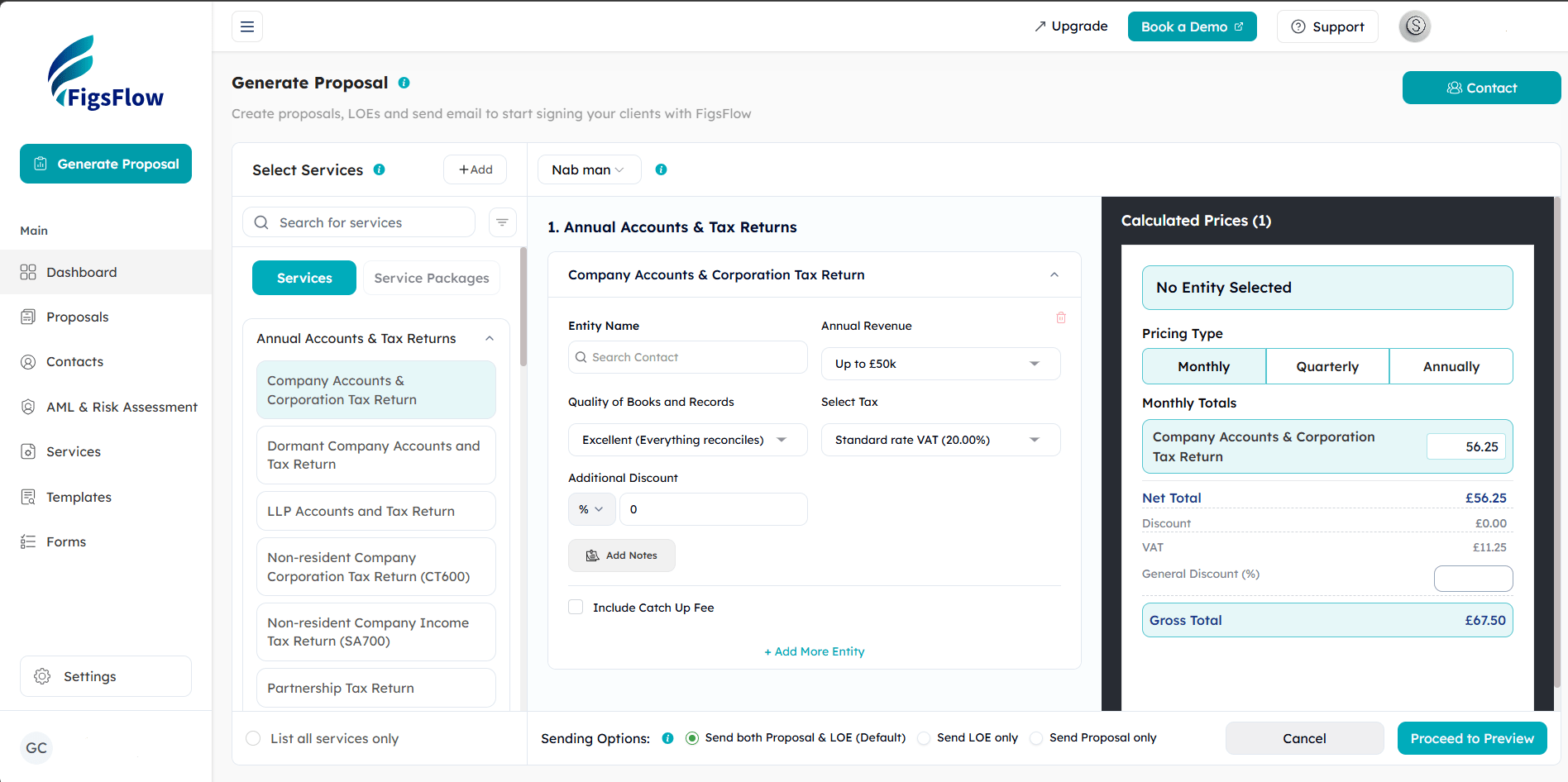
For each service, the calculator works from client-specific input parameters — transaction volume, quality of records, VAT status, number of bank accounts, frequency of reporting, and more. These inputs feed into a configurable pricing formula that outputs the fee instantly, with the net total, VAT, and gross total all visible in a live panel as you build the proposal. You can apply discounts at both service level and proposal level, add catch-up fees for new clients with a backlog, and override any price manually without affecting the underlying formula.
What sets FigsFlow apart is the range of pricing models it supports from within the same workflow:
- Fixed fee pricing
- Value-based pricing
- Packaged and subscription pricing
- Contingent and conditional pricing
- Milestone-based pricing
- Tiered and volume-based pricing
- Time-based and hourly rate billing
- Blended and hybrid pricing
Every model is supported natively.

GoProposal also allows users to set and override service prices, and its Core Pricing Matrix provides a starting benchmark. However, the calculator relies on static, historic rates that users are expected to keep current manually. There is no real-time price update either — any adjustment to a service fee requires clicking “Recalculate” and waiting for the total to refresh. The range of supported pricing models is also more limited, covering fixed fees and one-off charges but lacking the conditional logic, tiered structures, and blended models that more complex engagements typically require.
For firms that price a wide range of services across varied client types, the difference in capability is significant.
| Features | GoProposal | FigsFlow |
|---|---|---|
| Real-Time Price Updates | Requires clicking "Recalculate" and waiting for the total to refresh | Adjusted totals reflected instantly as inputs are changed |
| Advanced Pricing Configuration | Not available; pricing is based on static historic benchmarks | Fully configurable pricing engine with input parameters, calculated variables, conditional logic, tiered rates, and volume-based pricing |
| Pricing Interface | Functional but dated; limited visual feedback during configuration | Clean, well-organised interface with a live running total visible throughout |
| One-Off Fee Option | Available | Available |
| Contingent and Conditional Pricing | Not available | Available; supports percentage-based fees and complex IF/AND/OR conditional logic |
| Flexible Pricing Models | Supports fixed fees and one-off charges; limited to simpler billing structures | Supports eight pricing models including fixed, value-based, packaged, contingent, milestone, tiered, time-based, and blended hybrid pricing |
| Catch-Up Fee Calculation | Not available | Available; catch-up fees calculated automatically per service for new clients with a backlog |
| Web Embed Pricing Page | Not available | Available; publish a live client-facing pricing page directly on your firm website |
Which Tool Has Stronger CRM & Client Management Features?
The two platforms take different approaches to client management. GoProposal’s client-facing features are centred around proposal management — managing and tracking clients primarily through the proposal workflow. For broader CRM functionality, it connects to third-party practice management tools including AccountancyManager, Senta, and Karbon, which handle task creation, contact storage, and client timelines.
FigsFlow includes a built-in client management system within the platform. Each client has a dedicated profile that stores contact details including email, address, UTR, and PAYE numbers. Multiple contacts can be assigned to an organisation client, and a Relationship Manager and Client Manager can be assigned per client. The profile page includes an overview of revenue generated and total deals, a timeline of all activities and updates, a documents tab for proposals and LOEs, and a notes section for internal record-keeping. Client data can be imported in bulk via CSV or Excel, or pulled directly from Companies House. For firms already using HubSpot, FigsFlow offers a direct integration for CRM sync.
| Features | GoProposal | FigsFlow |
|---|---|---|
| Centralised Client Records | Requires third-party tools such as AccountancyManager, Senta, or Karbon | Built-in client profiles storing contact details, UTR, PAYE numbers, revenue overview, documents, and activity timeline |
| Client Data Import | Contacts can be pulled from connected practice management tools | Bulk import via CSV or Excel; direct import from Companies House |
| Task and Reminder System | Proposal reminders and email notifications available | Proposal reminders, email notifications, proposal auto-expiry, and reactivation of lost proposals available |
| Proposal Status Tracking | Auto status marking as Sent, Live, Seen, Won, and Lost | Auto status marking as Live, Draft, and Won |
| Client Notes | Not available | Notes can be added at client profile level with option to attach relevant documents |
| Email and Outlook Integration | Direct integration available | Direct integration with Gmail and Outlook; all client emails stored within the platform |
| CRM Integration | Connects to AccountancyManager, Senta, and Karbon | Direct HubSpot integration; Zapier available for additional connections |
Which Tool Integrates Better with Accounting Apps?
Both platforms connect with the core tools accounting firms rely on, but there are meaningful differences in scope and purpose.
FigsFlow’s integrations span across accounting, payments, compliance, communication, and CRM. These include Xero, QuickBooks, Stripe, GoCardless, Adfin, Gmail, Outlook, HubSpot, Zapier, Companies House, Trust ID, and Irish CRO. The compliance-facing integrations are particularly noteworthy. Companies House allows you to pull company name, registration number, address, and officers directly into a proposal without manual entry. Trust ID handles NFC chip passport verification and higher-assurance identity checks for AML compliance. Irish CRO enables direct import of Irish company records. None of these are available in GoProposal.
GoProposal’s integrations are focused on accounting software, payment collection, and practice management. These include Xero, QuickBooks, Sage, GoCardless, Zapier, Dext Precision, AccountancyManager, Senta, and Karbon. Each integration is designed to reduce manual data entry after a proposal is accepted, pushing client data and triggering tasks in connected tools automatically.
Here is what each integration means in practice:
| Integration | Available In | What This Means for Accountants |
|---|---|---|
| Xero and QuickBooks | Both | Draft invoices generated automatically when a client accepts a proposal; client data pushed directly into the accounting system |
| Zapier | Both | Connect to thousands of other apps and build custom automated workflows without coding |
| GoCardless | Both | Direct debit collection set up at the point of proposal acceptance; no separate payment platform needed |
| Gmail and Outlook | FigsFlow only | Send and track proposals and follow-ups directly from your inbox without leaving FigsFlow; all emails stored against the client record |
| HubSpot | FigsFlow only | Two-way CRM sync; leads flow into FigsFlow and signed clients flow back into HubSpot automatically |
| Stripe and Adfin | FigsFlow only | Card payments, Pay-by-Bank, and digital wallet collection; clients can pay directly at the point of signing |
| Companies House | FigsFlow only | Instantly pull company name, registration number, address, and officers into a proposal without manual entry |
| Trust ID | FigsFlow only | NFC chip passport verification and higher-assurance identity checks for AML compliance |
| Irish CRO | FigsFlow only | Import Irish company records directly including name, number, address, and officers |
| Sage | GoProposal only | Proposal data pushed into Sage for invoice and client record management |
| AccountancyManager, Senta, and Karbon | GoProposal only | Automatic task creation and client records triggered once a proposal is accepted |
| Dext Precision | GoProposal only | Data integration for bookkeeping quality insights linked to proposals |
Which Tool Handles AML and Compliance Better?
AML compliance is a legal requirement for UK accounting firms, not an optional extra. The two platforms approach it very differently.
FigsFlow has a fully built-in AML module that sits alongside proposals and engagement letters within the same platform. It covers KYC, PEP and sanctions screening, Amberhill checks, address verification, liveness checks via Trust ID, Customer Risk Rating, Enhanced Due Diligence, and firm-wide risk assessments. Every action is logged with a full audit trail. Checks are priced from £2.10 per ID check plus a fixed fee of £8 per month, with a minimum of 10 credits required.
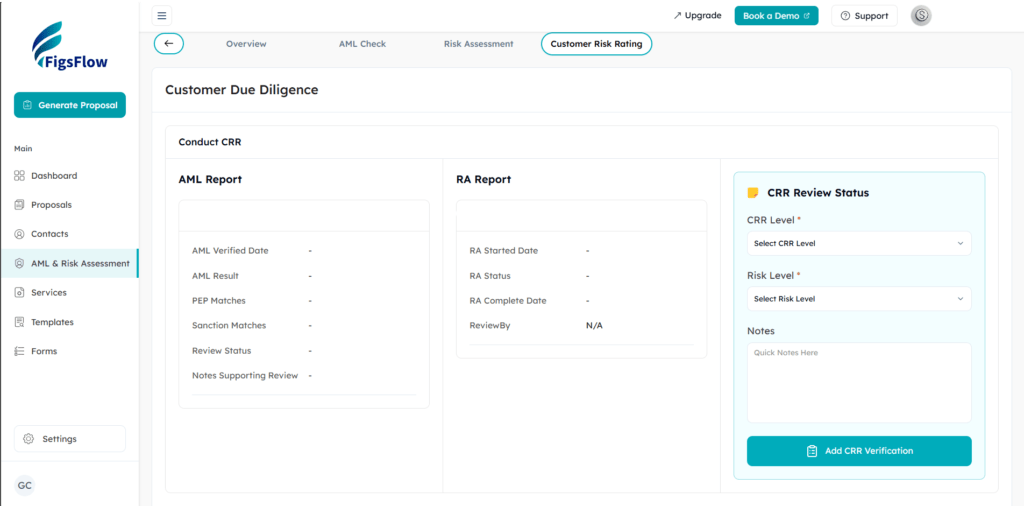
GoProposal offers AML as a paid add-on covering KYC and risk assessments. It does not include the broader range of screening, EDD, and firm-wide compliance tools that FigsFlow provides as standard.
| Features | GoProposal | FigsFlow |
|---|---|---|
| AML Module | Available as a paid add-on | Built into the platform across all plans |
| KYC Checks | Available via add-on | Included; document verification, MRZ validation, and liveness checks supported |
| PEP and Sanctions Screening | Not confirmed in available product information | Included as part of the AML check workflow |
| Amberhill Checks | Not available | Included |
| Customer Risk Rating | Available via add-on | Simplified, standard, or enhanced rating assigned alongside AML report and risk assessment |
| Enhanced Due Diligence | Not available | Built-in EDD templates included |
| Firm-Wide Risk Assessment | Not available | Included |
| Full Audit Trail | Not confirmed in available product information | Full audit trail logged for every check and action |
| Pricing | Paid add-on; pricing not publicly listed | From £2.10 per ID check plus £8 per month fixed fee; minimum 10 credits required |
Which Tool Provides Better Value for Money?
Both platforms offer four pricing tiers, but the comparison shifts significantly once you account for what is and is not included at each level.
GoProposal’s core plans cover proposals, pricing, and basic client management. Engagement letter templates, e-signatures, and AML checks all require paid add-ons on top of the base subscription. OverSuite starts at £45 per month and GoProposal AML is priced separately. For a firm that needs all three, the monthly cost adds up quickly before any core features are unlocked.
FigsFlow includes engagement letter templates, e-signatures, regulatory compliance, and LOE-only mode across every plan from the Starter tier upward. AML checks are available separately on a pay-as-you-go basis from £2.10 per check. There are no add-ons required to access the core functionality.
| Features and Plans | GoProposal | FigsFlow |
|---|---|---|
| Plan Names and Pricing (monthly) | Solo £70, Basic £100, Standard £140, Premium £225 | Starter £8, Essentials £24, Standard £60, Professional £120 |
| Users Included | 1 user on Solo and Basic; 2 users on Standard; 10 users on Premium | 1 user on Starter; 3 users on Essentials; 5 users on Standard; 10 users on Professional |
| Proposal Limit | 5 on Solo; 10 on Basic; 50 on Standard; unlimited on Premium | 10 on Starter; 30 on Essentials; 75 on Standard; unlimited on Professional |
| Engagement Letter Templates | Requires OverSuite add-on from £45 per month | Included from Starter tier; no add-on required |
| E-Signatures | Requires OverSuite add-on | Included in all plans |
| Send Engagement Letter Without Proposal | Requires OverSuite add-on | Included in all plans |
| AML and Compliance | Requires GoProposal AML add-on | Available from £2.10 per ID check plus £8 per month fixed fee; no add-on required for core plans |
| Third-Party Integrations | Available across all plans | Available on Professional plan |
What Is Next: GoProposal vs FigsFlow
GoProposal’s website and product documentation do not reference any upcoming features or roadmap plans. Based on available information, there is no publicly stated direction for where the product is heading next.
FigsFlow has a confirmed development roadmap with several modules in active progress:
Task Management and Service Delivery is in development and will include:
- Automatic job creation when a proposal is accepted and an LOE is signed
- Service templates with predefined task steps covering instruction tasks, email tasks, checklist tasks, and deadline tasks
- Kanban board for visual workflow tracking across the team
- Task assignment by team member and capacity planning
- Time tracking, both automatic and manual, linked to tasks
- Timesheet approval workflows with role-based permissions
- Cost estimation and budget tracking against actual delivery time
Client Portal is being built out and will cover:
- Centralised document folders with real-time sync
- Client-facing task and job progress tracking
- Real-time chat between clients and the delivery team
- Document upload and electronic signing within the portal
- Client to-do lists
- Financial reporting including P&L and balance sheet visible to clients
Native Invoicing Module is in development to sit alongside the existing Xero, QuickBooks, Stripe, GoCardless, and Adfin integrations that are already live.
For firms evaluating both platforms on where they will be in the next 12 to 24 months, FigsFlow’s trajectory points toward a full practice management platform. GoProposal, based on available information, remains focused on its current proposal and engagement letter functionality.
So, Which Tool Best Serves Accountants?
We interviewed 100+ accountants, tax advisors, and bookkeepers to find out what they value most in proposal and engagement letter software. Their priorities were clear:
- Customisable proposal and engagement letter templates
- Automated service pricing
- Built-in regulatory compliant wordings and clauses
- Integrated e-signatures
- Client onboarding workflows including data collection and ID checks
- Multi-user support
- CRM functionality
- Accounting software integrations
When you measure both platforms against these priorities, the picture is straightforward. FigsFlow covers every item on this list across all plans without requiring add-ons. GoProposal covers several of them well but places key features including engagement letter templates, e-signatures, and CRM functionality behind the OverSuite add-on, which starts at £45 per month on top of the base subscription.
For accountants who want a single platform that handles proposals, pricing, compliance-grade engagement letters, AML, and client onboarding without piecing together multiple tools or add-ons, FigsFlow is the more complete solution at every price point.
Goproposal & FigsFlow: Checklist for Decision Making
| Feature | GoProposal | FigsFlow |
|---|---|---|
| Proposal Creation | Multiple manual inputs required; time consuming and prone to inconsistency across the team | Select services, add client, review pricing and send; entire process completed in under 60 seconds |
| Engagement Letter Templates | Requires OverSuite add-on from £45 per month; not available on base plans | 150+ regulatory compliant templates included across all plans; no add-on required |
| Service Pricing Engine | Core Pricing Matrix based on static benchmarks; requires manual upkeep to stay current | Advanced pricing engine with dynamic variables, eight pricing models, and live running totals |
| AML and Compliance | Available as a paid add-on; covers KYC and risk assessments only | Built in across all plans; includes KYC, PEP and sanctions screening, EDD, firm-wide risk assessment, and full audit trail |
| E-Signatures | Requires OverSuite add-on | Built in across all plans; no third-party tool required |
| CRM and Client Management | No native CRM; relies on third-party tools such as AccountancyManager, Senta, or Karbon | Built-in client profiles with contact details, activity timeline, documents, and notes |
| Platform Integrations | Xero, QuickBooks, Sage, GoCardless, Zapier, AccountancyManager, Senta, Karbon, Dext Precision | Xero, QuickBooks, Stripe, GoCardless, Adfin, Gmail, Outlook, HubSpot, Zapier, Companies House, Trust ID, Irish CRO |
| Value for Money | Base plans start at £70 per month; key features require OverSuite and AML add-ons on top | Base plans start at £8 per month; engagement letters, e-signatures, and compliance tools included as standard |
| User Interface | Well structured but some features are difficult to locate | Related features grouped by module; clean layout with easy navigation |
| Roadmap and Future Development | No publicly available roadmap or upcoming feature announcements | Active roadmap including task management, time tracking, client portal, and native invoicing module |
| Overall Score | 6 / 10 | 9 / 10 |
Final Verdict: GoProposal or FigsFlow?
GoProposal is a capable tool for proposal creation, but the moment you need engagement letter templates, e-signatures, or AML compliance, the costs add up fast through paid add-ons that should be included from the start.
FigsFlow covers all of that from the lowest tier. Proposals, pricing, 150+ regulatory compliant engagement letter templates, built-in e-signatures, AML checks, and client management — all in one platform with no extras required. Its Starter plan begins at £8 per month compared to GoProposal’s £70 base plan, before add-ons are even considered.
With an active roadmap that includes task management, time tracking, a client portal, and a native invoicing module, FigsFlow is not just the better option today but a platform built to grow with your firm.
If you want full functionality without the hidden costs, FigsFlow is the clear winner.
FAQs
What is the best alternative to GoProposal?
Can I use both GoProposal and FigsFlow?
How do I transition from GoProposal to FigsFlow?
How do I transition to GoProposal?
How much GoProposal cost?
Run your firm on one platform
Proposals, engagement letters, pricing and AML — built for ACCA, ICAEW, ATT, CIOT, AAT and CIMA firms.