
A Complete Guide to Business Proposals through FigsFlow
Unlock the secrets to creating effective business proposals through FigsFlow. Streamline your process, boost client engagement, and drive success with ease.
In the fast-paced world of accounting and taxation, it is essential to create winning proposals to secure new clients and contracts efficiently. However, managing large-scale proposal projects can be daunting due to the many stakeholders involved, intricate requirements, and tight deadlines. Fortunately, Figsflow, a cutting-edge Proposal Management System (PMS), offers a solution to streamline this process. It does so through dynamic value setup and customisation features that revolutionise how organisations approach proposal management, especially for large-scale projects.
Figsflow simplifies and improves the process of creating proposals for businesses, regardless of their size. Figsflow achieves this by providing user-friendly tools and customisable templates to ensure that your proposals are professional, thorough, and personalised to address your client’s specific requirements.
What Is the Importance of Business Proposals?
Creating compelling proposals and letters of engagement is crucial for any business looking to grow its customer base.
- Proposals for Accounting Professionals – Proposals are not just formal papers. They are your chance to show how good you are, understand your client’s needs, and show how you can add value. A well-written proposal can make you stand out from the competition and increase your chances of getting a deal.
- Engagement Letters for Accounting Professionals – Engagement letters are equally important because they formalise the relationship between your business and the client. These documents clearly define the scope of work, responsibilities and terms of the agreement, ensuring both parties are on the same page. Figsflow helps streamline the creation of engagement letters, making it easier to establish professional and legally sound agreements.
- Pricing – It is crucial to set the right price for your services when making business proposals. Figsflow’s pricing feature helps you create accurate and competitive pricing models. This ensures that your proposals are not only compelling but also reflect the true value of your services. It assists in maintaining profitability while meeting client expectations.
How Can You Generate Proposals Using Figsflow?
Figsflow simplifies proposal generation by allowing you to add and move elements according to your preferences. The proposal tab contains every option required to create an enticing proposal that will make sure you crack your way into the deal.
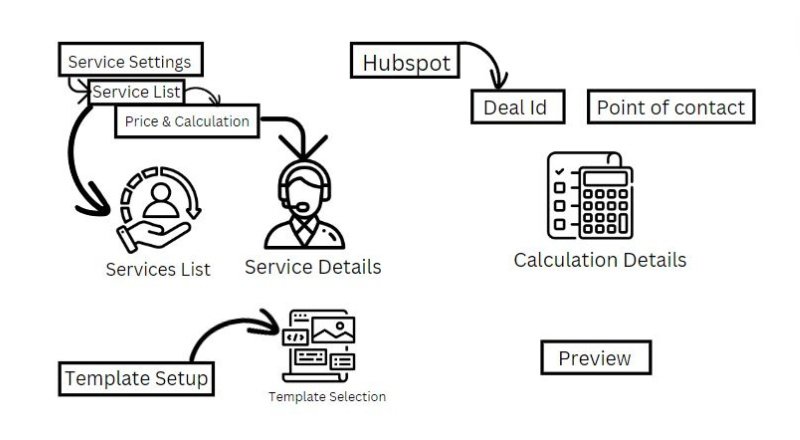
- Select Services – Carefully consider all the services your company can provide to clients. Select all applicable services, ensuring each client receives a unique set of services tailored to their needs.
- Customise Client and Service Options – The details for each service, as well as the client’s name, are shown on the right side of the Service List. In addition, customise options related to the client and your services, which will impact the calculation.
- View Calculation Details – On the far right of the screen, you can view the calculation details. There are three accounting periods: monthly, quarterly, and yearly, along with non-recurring services displayed separately as One-Off.
- Select Deals and Points of Contact – Use the top right drop-down menu labelled “Select Deal” to choose deals from HubSpot. Once the deal is selected, choose the Point of Contact from another drop-down menu.
- Choose Template – Select an appropriate template for the proposal and letter of engagement from the software’s template setup tab.
- Preview and Finalise – After customising your proposal and letter of engagement, click the preview button to review. You can then save the documents as a draft or click “Send Live” to automatically send them to your client via email.
All saved drafts and sent documents can be found in the proposal list section of Figsflow software.
Dos and Don’ts
Here are some tips and tricks to streamline your business proposal creation process:
- Be Clear and Concise – Make sure your proposal is easy to read and understand.
- Tailor Each Proposal – Customise each proposal to address the specific needs and preferences of the client.
- Review Thoroughly – Always preview your proposals before sending them to avoid errors and ensure completeness.
- Avoid Jargon – Use simple and clear language to avoid confusion.
- Don’t Overpromise – Be realistic about what you can deliver to maintain credibility.
- Follow Up – Follow up with clients after sending proposals to address any questions or concerns they may have.
Process of Creation
Here’s a wireframe that figuratively describes how proposal creation works in Figsflow.
You can also view the same format of the Business Proposal document.
Proposal-Sample-Figsflow Download
Conclusion
Figsflow provides a comprehensive and user-friendly platform for businesses to craft compelling proposals and engagement letters. Its advanced functionalities and customisable options empower organisations to optimise their proposal procedures, resulting in enhanced efficiency, precision, and client-focused approach. Figsflow enables companies to boldly pursue new prospects, secure contracts, and drive their expansion in the current competitive business environment.
Run your firm on one platform
Proposals, engagement letters, pricing and AML — built for ACCA, ICAEW, ATT, CIOT, AAT and CIMA firms.